
Veritas Books
Structured Financial Data Preparation & CSV Categorisation
Preparing bank transaction CSV files for bookkeeping starts with making the data usable.
Raw bank exports are often not ready to work with immediately. Transaction descriptions can be inconsistent, merchant names may be unclear, and categories are usually missing. Before the data can be used reliably in a bookkeeping workflow, it often needs to be cleaned, structured, and reviewed. This guide explains what that preparation involves, why it matters, and how a raw transaction file can be turned into a clearer, more useful dataset.
Preparing transaction data before bookkeeping begins helps reduce manual review, improve consistency, and create a structured dataset ready for bookkeeping workflows.
The Typical Problems With Raw Transaction Exports
Raw bank CSV files often contain :
- Inconsistent transaction descriptions
- Duplicate or unclear merchant names
- Missing categorisation
- Formatting inconsistencies between banks
While the data itself is accurate, it is rarely organised in a way that supports efficient bookkeeping.
This leads to:
- Slower transaction review
- Increased manual work
- Higher risk of inconsistency
What Data Preparation Involves
This service takes raw bank CSV or Excel transaction exports and organises them into a cleaner structure for review.
The output typically includes:
• Original transaction descriptions preserved
• Merchant names identified where possible
• Consistent category assignments
• Transaction type classification: Income, Expense, Transfer or Refund
• Review flags for unclear transactions
• Date formats reviewed and standardised where required
• A clean Excel or CSV file ready for review
The aim is not to replace bookkeeping judgement, but to reduce the amount of manual sorting required before bookkeeping begins.
Example 1: Basic Data Preparation
A typical transaction export may contain:
• Raw bank descriptions
• Unclear merchant references
• No categorisation
• No transaction type information
• Transactions requiring clarification
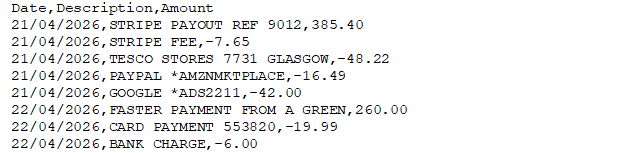
After preparation, the dataset is transformed into a structured format:
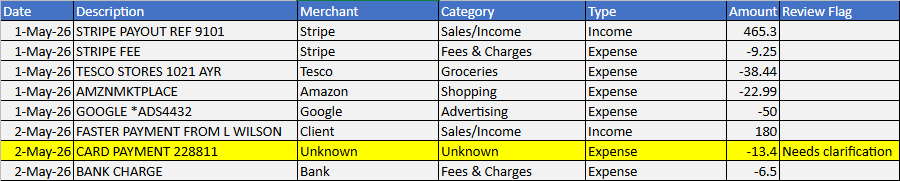
• Original transaction descriptions are preserved
• Merchant names are identified where possible
• Categories are applied consistently
• Transaction types are classified (Income, Expense, Transfer or Refund)
• Date formats are reviewed and standardised where required
• Unclear transactions are flagged for clarification
• Data is organised into a consistent structure for review
Rule Based Categorisation Workflow
Transactions are processed using a structured rules list.
For example :
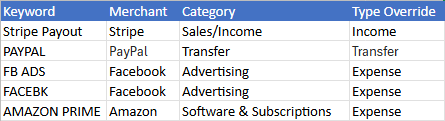
This helps apply merchant identification, categorisation and transaction types consistently across repeated transaction patterns.
The workflow uses Excel-based lookup formulas connected to the rules lists.
When a transaction is processed :
• The transaction description is scanned for recognised merchant keywords. If a match is found, the corresponding merchant name is assigned automatically.
• Also the matching Category is then applied from the rules database.
• As are transaction Types such as Income, Expense, Transfer or Refund are assigned using the associated rules.
The rules database is used to identify known transaction patterns and apply merchant names, categories and transaction types consistently across the dataset. The rules database, together with Excel-based lookup formulas, is used to identify known transaction patterns and apply merchant names, categories and transaction types consistently across the dataset. The prepared dataset shown below demonstrates the result of this process.
Example 2: Handling Unclear Transactions & Exceptions
Not every transaction can be confidently identified from the transaction description alone.
While many transactions can be matched using the rules database, some require additional review or client clarification.
These may include:
• Unclear payment references
• Unknown suppliers or merchants
• Similar merchant names
• Transfers requiring confirmation
• Transactions requiring client clarification
Example Raw Export
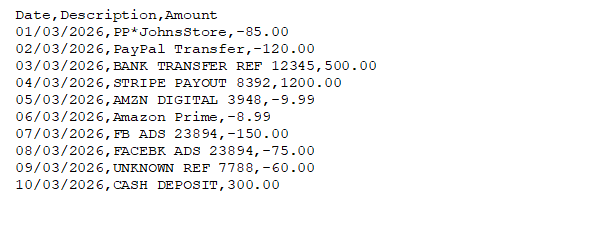
Example Prepared Dataset
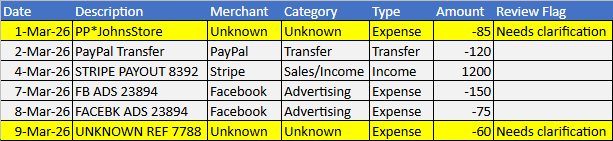
The result is a structured transaction dataset with merchant names identified where possible, categories applied consistently, transaction types classified, and unclear entries flagged for clarification rather than guessed.
Unknown Items Are Flagged Not Guessed
Not every transaction should be automatically categorised.
Some descriptions are too vague to classify confidently, for example :
• PP*JohnsStore
• UNKNOWN REF 7788
These are flagged clearly as requiring clarification.
For Example :

This keeps the process transparent and avoids false certainty.
Global and Client-Specific Rules
The rules database consists of both global rules that apply across many businesses and client-specific rules developed around recurring transaction patterns.
Some rules apply Globally across many businesses, such as :
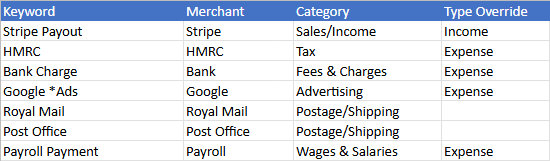
Other rules are specific to a particular type of client.
For example, a restaurant may have suppliers such as :

An ecommerce client may have:
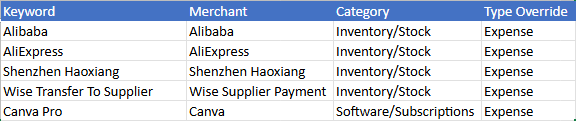
A tradesperson may have :
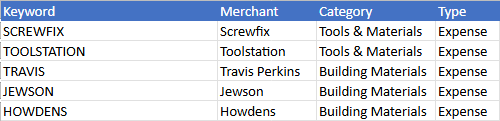
Over time, recurring merchants can be added to a client-specific rules list, making future files quicker and more consistent to prepare.
Flexible Output Formats
The prepared dataset is delivered in a clear, structured format designed for review and bookkeeping workflows.
The standard output format includes :
• Date
• Description
• Merchant
• Category
• Type
• Amount
• Review Flag
Where practical, the output can be adapted to match a client’s preferred structure or workflow.
Common adjustments may include :
• Column order
• Column naming conventions
• Additional non-accounting fields
• Client-specific categorisation structures
• Spreadsheet layout preferences
Additional formatting options, such as separate Money In / Money Out columns, may be available where required by the client’s workflow or import template.
If you use a specific template or bookkeeping workflow, feel free to provide an example and I will review the requirements before work begins.
Please note that this service focuses on transaction data preparation and organisation. It does not include bookkeeping entries, VAT treatment decisions, account coding, tax advice or accounting advice.
Send a Sample CSV
If you have a bank transaction export that needs to be prepared before bookkeeping begins, you can send a sample CSV for review.
Each file is assessed individually so you can see:
- What can be cleaned and structured
- Whether any transactions require manual review
- How the final output can be prepared for your workflow
- The likely scope and price before any work begins
An optional free sample clean of up to 50 transactions is also available.
There is no obligation, and no work begins without your approval.